
New Reports
How to use the new reporting interface in the viva.com merchant account.
Overview
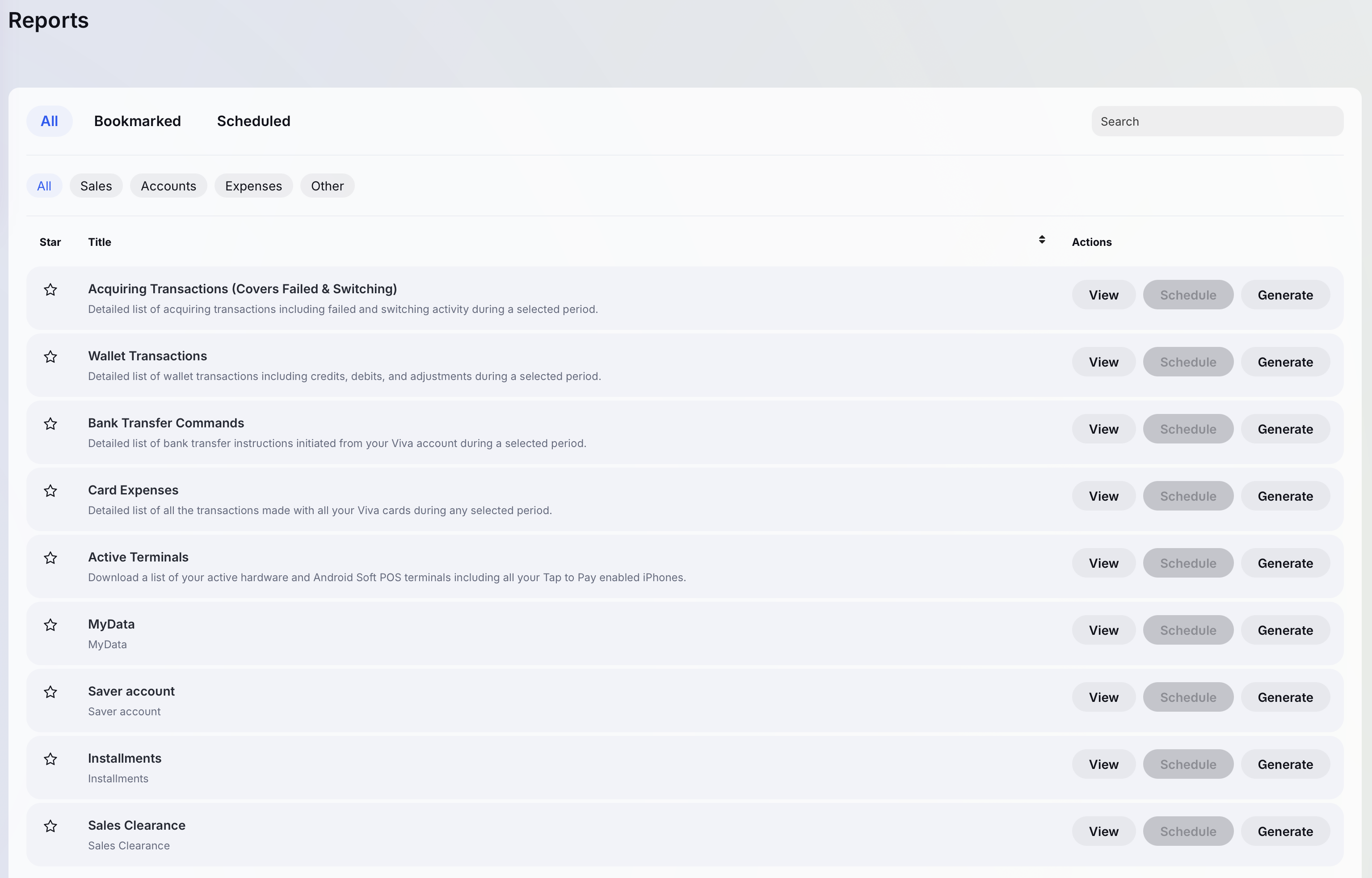
The new Reports interface in the viva.com merchant account provides customers with enhanced visibility and control over their transactional data. Merchants can easily view, generate, schedule, and bookmark reports directly from the account UI, enabling flexible and efficient reporting workflows without manual data handling.
Features
With this update, users can:
- Access previously generated reports via View
- Create new reports on demand using Generate with a selected date range
- Automate recurring report creation through Schedule, with configurable frequency options (daily, weekly, or monthly) and automatic delivery via feed notifications
- Save frequently used reports using the Bookmark feature for quick and convenient access
Steps
To generate and access reports in the new interface, follow the steps below:
Log in to your viva.com merchant account.
Navigate to the Reports section.
Click Generate to create a new report by selecting the desired date range.
Once generated, access the report under the View tab.
Reports
The new reports can be generated by pressing the “Generate” button. After the report is generated it can be found under “View”.
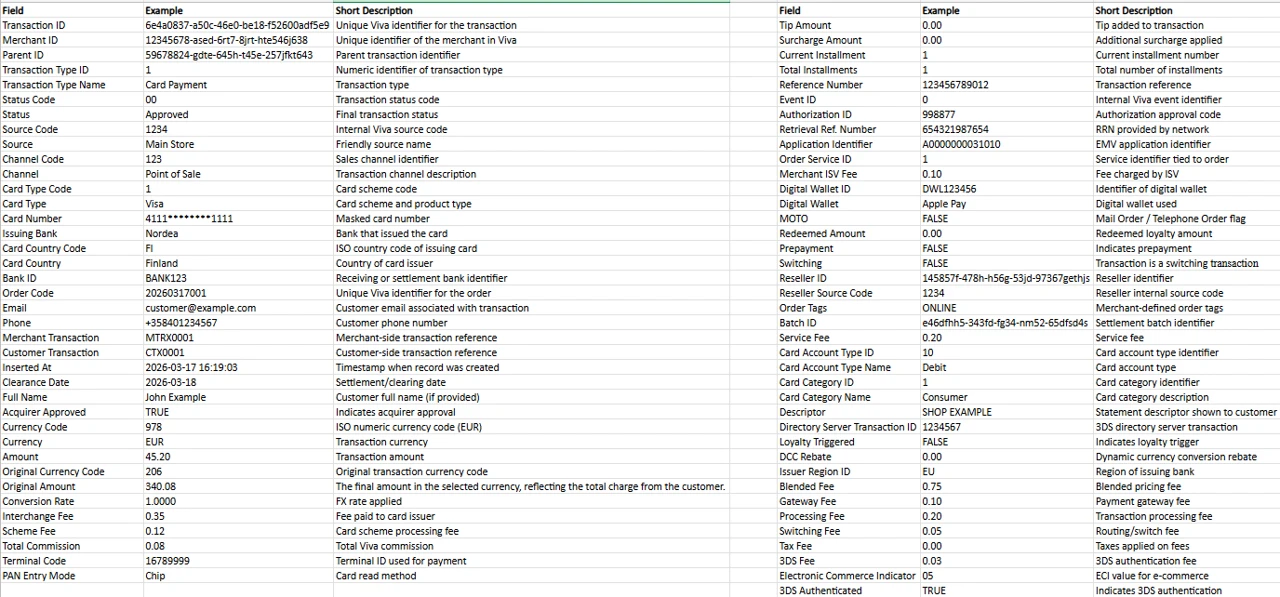
The reports open in excel format and here are examples that shows the fields included in each report.
These are the reports that can be found under “New reports”:
Acquiring Transactions (Covers Failed & Switching)
Example:
Wallet Transactions
Example:

Description:
- Created (UTC) = Timestamp when the transaction record was created (stored in UTC).
- Value Date = Accounting date used for settlement and reporting purposes.
- Subtype ID = Identifier defining the transaction subtype.
- Type ID = High-level transaction category identifier.
- Wallet ID = Numeric identifier of the Wallet account affected by the transaction.
- Amount = Transaction amount applied to the wallet. Negative values represent debits (fees, charges).
- Target Amount = Converted or settled amount after currency conversion or internal calculations.
- Target Available = Amount that affects the available balance after the transaction is processed.
- Currency Code = ISO-4217 numeric currency code (978 = EUR).
- Wallet Transaction ID = Unique UUID identifying the transaction across Viva systems.
- Is Authorization = Indicates whether the record is an authorization (TRUE) or a posted transaction (FALSE).
- Tag = Optional internal or merchant-defined tag for grouping or labeling transactions.
- Person ID = Unique identifier of user associated with the transaction.
- Counterpart = Describes the counterpart involved in the transaction (e.g. merchant or wallet reference).
- User Description = Description explaining the purpose of the transaction.
Bank Transfer Commands
Example:
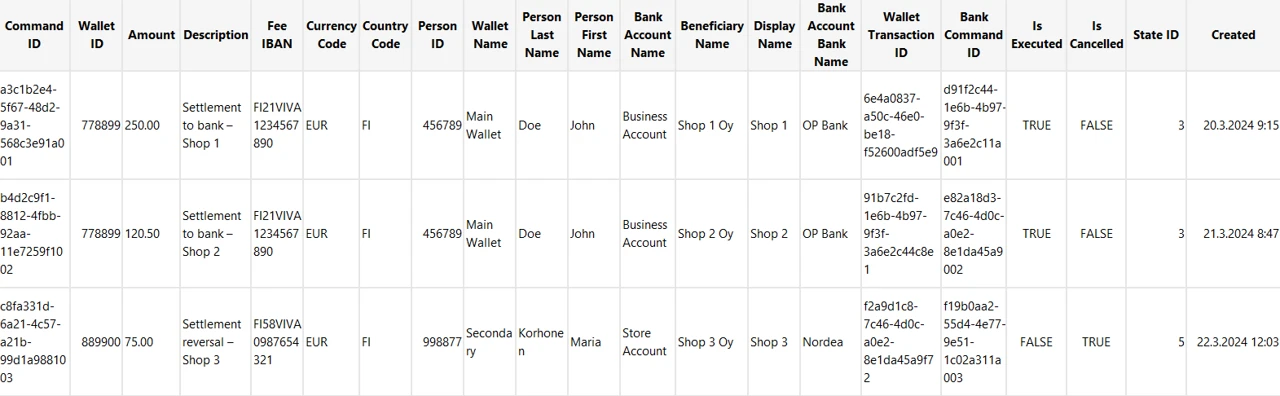
Description:
- Command ID = Unique identifier of the payout/transfer command.
- Wallet ID = Identifier of Wallet from which funds are moved.
- Amount = Amount transferred to the bank account.
- Description = Description.
- Fee IBAN = IBAN used for fee collection, if applicable.
- Currency Code = ISO currency code (e.g. EUR).
- Country Code = ISO country code.
- Person ID = Identifier of user.
- Wallet Name = Friendly name assigned to the Wallet.
- Person Last Name / First Name = Legal name of the person.
- Bank Account Name = Name of the linked bank account.
- Beneficiary Name = Legal beneficiary receiving the funds.
- Display Name = Short name shown in UI or reports.
- Bank Account Bank Name = Name of the beneficiary’s bank.
- Wallet Transaction ID = UUID identifying the underlying wallet transaction.
- Bank Command ID = UUID identifying the bank-side execution command.
- Is Executed = Indicates whether the bank transfer was executed.
- Is Cancelled = Indicates whether the command was cancelled.
- State ID = Internal status code of the command lifecycle.
- Created = Date and time when the command was created.
Card Expenses
Example:

Description:
- Wallet Transaction ID = Unique identifier of the transaction inside the Viva Wallet system.
- Authorization Date = Date and time when the transaction was authorized.
- Clearance Date = Date and time when the transaction was cleared/settled.
- Person ID = Identifier of user.
- Masked Number = Card number used in the transaction.
- Amount = Transaction amount.
- Currency Code = ISO currency code of the transaction (e.g. EUR).
- Sub Type ID = Transaction subtype (e.g. purchase, refund).
- Card Holder ID = Identifier of the cardholder.
- Card Holder = Cardholder name.
- Description = Transaction description.
- MCC = Merchant Category Code defining the merchant’s business type.
- MCC Group Name = Category name derived from the MCC.
- Wallet ID = Unique identifier of the Viva Wallet account used.
Active Terminals
Example:

Description:
- TID = Terminal specific number.
- Terminal Type = Which terminal is used (SoftPOS, Ciontek CS50, Sunmi P3).
- Serial = Serial number of the device.
- Status = Terminal status.
- Source Code = Numeric code of the source (store).
- Source Name = Name of the source (store).
Get Support
If you would like to integrate with Viva, or if you have any queries about our products and solutions, please see our Contact & Support page to see how we can help!