
Setting up webhooks
Set up webhooks to receive notifications for events within your Viva account.
- Overview
- Create your webhook endpoint
- Handle requests from Viva
- Merchants and Marketplace Platforms
- ISV Partners
- Retry policy
- Get Support
Overview
Viva supports webhooks, a simple and powerful solution that allows you to receive notifications each time a specific event takes place. Webhooks are particularly useful for asynchronous events such as asynchronous payments, for example, when the funds of the customer are transferred from their bank account into your Viva account.
Create your webhook endpoint
To receive webhooks, Viva requires that you respond to every notification. This ensures that your server is properly accepting notifications.
You should set up an HTTP endpoint on your server and make sure that it can accept webhook requests with a POST method.
Handle requests from Viva
You should configure your endpoint to read all objects and parameters provided by Viva for every webhook event type you receive.
Every webhook notification includes the following properties:
- EventData (TransactionEventData Object): The object that contains the actual transaction details.
- EventTypeId (int): The type of the event that triggered the notification.
- Created (datetime): The UTC date and time when the notification was initially created.
The TransactionEventData object will have different parameters depending on the event type.
POST request with a JSON payload. In order for Viva to assume you have successfully received a webhook notification, you need to respond with HTTP status 2xx to the POST calls received from us.
The below Node.js example may be useful for handling the webhook verification request and the webhook notification request:
if (steps.webhookEndpoint.event.method === 'POST') {
  console.dir(steps.webhookEndpoint.event.body);
  $respond({
    status: 200,
    body: { message: 'ok' }
  });
  return;
}

const axios = require("axios");

var merchantId = '[your demo/production Viva Merchant ID]';
var apiKey = '[your demo/production Viva API key]';

var credentials = Buffer.from(merchantId + ':' + apiKey).toString('base64');

const resp = await axios({
  method: "GET",
  url: "[Environment URL]",
  headers: {
    "Authorization": "Basic " + credentials,
  }
});

var code = resp.data.Key;

$respond({
  status: 200,
  headers: { "test-header": "value" },
  body: { key: code }
});

console.log('Webhook has been validated');
👉 Merchants and Marketplace Platforms
1️⃣ Generate a webhook verification key
Before receiving a webhook notification to your website, you need to create a unique verification code for Viva to identify you. To do this, make a simple GET request to the ‘Retrieve webhook key’ API endpoint with Basic authentication headers.
This call will give you a "Key":"Value" pair in a JSON response, which your webhook endpoint can print as-is during the webhook verification process.
Webhook key example
{
  "Key": "B3248222FDCD1885AEAFE51CCC1B5607F00903F6"
}
2️⃣ Set up and verify your webhook in Self Care
To use a new webhook URL, Viva needs to verify that the given URL is available for immediate use.
Each time you enter a new webhook URL via the Viva banking app, you need to verify it by clicking on the Verify link next to the URL input field. This action starts the process of a simple GET HTTP call to your URL. Viva sends this request using TLS 1.2, so your server configuration needs to match that. Your page should print a JSON response such as the response shown above.
To set up your webhook endpoint within the Viva banking app:
- Log in to Viva - demo or live - and select the required account
- Visit Settings > API Access > Webhooks
- Click on the Create Webhook link - the New Webhook dialog box is displayed
- Enter your webhook URL in the URL field
- Click on the Verify link - if verified successfully, a confirmation message is displayed. If the verification is not successful, an error message is displayed
- Choose the desired webhook type from the Event Type dropdown
- Select the Active checkbox to activate notifications.
- Click on the Save button
This action will start the process of a simple GET http call to your URL. We send this request using TLS 1.2 so your server configuration needs to match that. Your page should print a JSON response such as the one shown above.
Deploy your webhook and make it public; not private. You can confirm it by visiting your URL using a browser and getting the key string number, as String parameter type in base64 format.
If you don’t get any key value then the authentication is not executed successfully, and your account credentials are not validated.
👉 ISV Partners
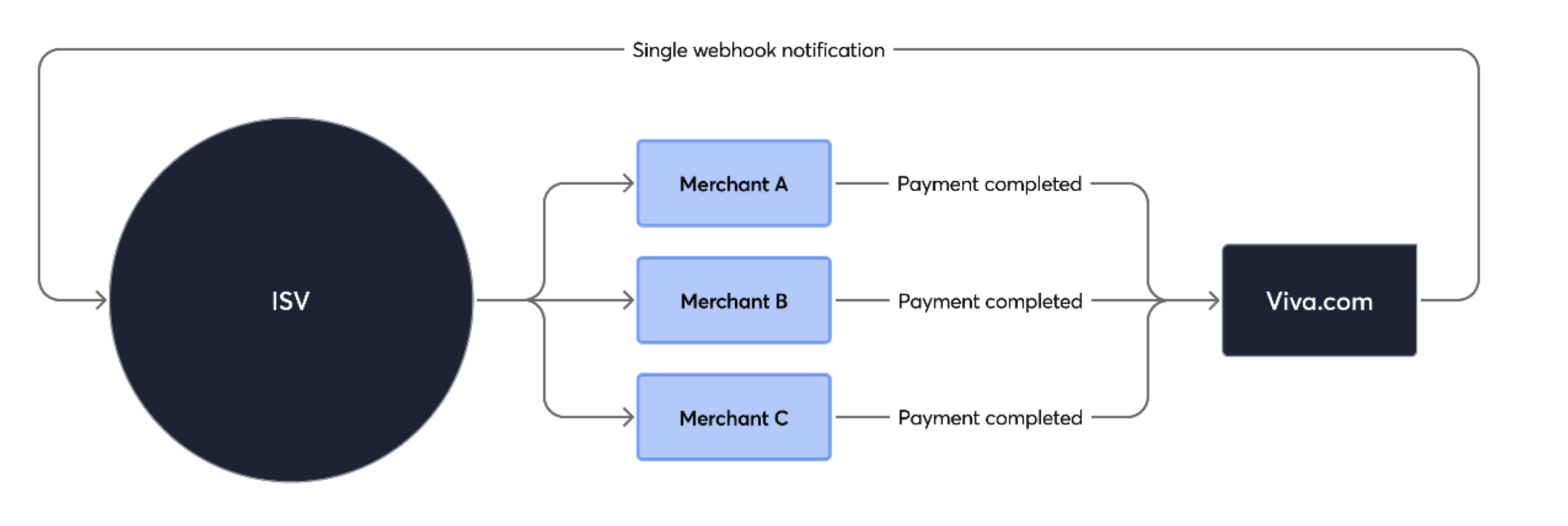
The ISV can setup the webhooks on ISV level, getting webhooks notifications for each transaction on which specified the ISV account credentials. So, the isv partner should not setup for each merchant webhook notifications.
1️⃣ Generate an ISV webhook verification key
Before receiving a webhook notification to your website, you need to create a unique verification code for Viva to identify you as an ISV Partner. To do this, make a simple GET request to ‘Retrieve webhook key for ISV’ API endpoint with Bearer authentication headers.
This call will give you a "key":"value" pair in a JSON response, which your webhook endpoint can print as-is during the webhook verification process.
Webhook key example
{
  "key": "C3248222FDCD1885AEAFE51CCC1B5607F00903F6"
}
2️⃣ Set up and verify your webhook with API
After generating the ISV webhook verification key, make sure your webhook endpoint is public, accessible via HTTPS, and able to return the verification key during Viva’s verification request. Once your webhook endpoint is ready, create a webhook for the events you want to be notified about.
This API](/isv-partner-program/payment-isv-api/#tag/Webhooks/paths/~1isv~1v1~1webhooks/post) call allows you to subscribe to specific webhook event types at the ISV level. You can subscribe the same event type to up to 10 different webhook URLs.
When an event occurs on any of your connected accounts(Viva merchants), the configured endpoint will receive a notification.
Retry policy
Viva will assume you have successfully received a webhook notification if you respond with HTTP status 2xx to the POST calls received from us.
In any other case, including HTTP status codes 3xx, 4xx, or 5xx, a retry mechanism will apply. Viva will retry 24 times - one initial attempt plus 23 retries. Retries will run once per hour until a 2xx status is received or the maximum retry threshold is reached.
Get Support
If you would like to integrate with Viva, or if you have any queries about our products and solutions, please see our Contact & Support page to see how we can help!