
Enable/Disable Instalments & Tips
How to enable Instalments & Tips in the 'Viva.com Terminal' application.
Overview
Instalments in the ‘Viva.com Terminal’ application allow your customer to pay the total purchase in small portions throughout a fixed period, as long as the following criteria are met:
- You registered your Viva account in Greece.
- The customer’s card supports installments (refers to Credit cards)
Handle payments with card installments
Activation Steps (Instalments)
From the main screen, navigate to the ‘More’ menu at the bottom-right:

From here, click on the ‘Instalments’ toggle to ensure they are enabled:

When using instalments, you can select the number of monthly instalments to offer (up to a maximum of 36):

If the card chosen is not able to be used for instalments then the following will be shown, where you can either pay in full, choose another card, or cancel the transaction:

Tipping
From the main screen, navigate to the ‘More’ menu at the bottom-right:
From here, click on the ‘Tipping’ toggle to ensure they are enabled:
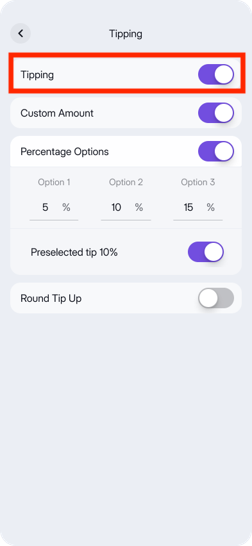
You will then see the following options
- Custom amount
- Percentage options
- Preselected tip
- Round tip up
Once configured, the selected tipping options will automatically be presented to customers during the payment process.

Tipping Options
Custom amount
This option allows users to manually enter a tip amount. If activated alongside percentage options, a fourth choice labeled ‘Other Amount’ will be available.
Percentage options
This option allows users to pre-define three tipping choices. Customers will see these options before making their payment, enabling them to decide on their preferred tip amount.
Preselected tip
When enabled, the middle percentage option configured under Percentage options will be automatically selected by default. If disabled, none of the percentage options will be preselected, and the customer will need to choose their preferred tip manually.
Round tip up
‘The ‘Round Tip Up’ option disables all other tipping functions and prompts the cardholder to add a tip that rounds the total amount up to the nearest whole number.
More specifically:
if the integer amount is below 20 and the decimal amount below 0.50, then the round up should be to the nearest integer amount, so 8.49 would become 9.00
if the integer amount is below 20 and the decimal amount above or equal to 0.50, then the round up should be to the second nearest integer amount, so 8.67 would become 10.00
if the integer amount is above or equal to 20 and the decimal amount below 0.50, then the round up should be to the second nearest integer amount, so 21.49 would become 23.00
if the integer amount is above or equal to 20 and the decimal amount above or equal to 0.50, then the round up should be to the third nearest integer amount, so 21.67 would become 24.00
if the integer amount is above or equal to 40 and the decimal amount below 0.50, then the round up should be to the third nearest integer amount, so 41.49 would become 44.00
if the integer amount is above or equal to 40 and the decimal amount above or equal to 0.50, then the round up should be to the fourth nearest integer amount, so 41.67 would become 45.00
Get Support
If you would like to integrate with Viva, or if you have any queries about our products and solutions, please see our Contact & Support page to see how we can help!