
Specify Brand Name
Merchants can customise the trade name displayed to customers throughout the payment journey, including on Smart Checkout, the 3DS authentication page and the customer's bank statement. This allows merchants to use a preferred business or trading name instead of the default name, providing a more consistent and recognisable brand experience.
Update the brand name
You can update your brand name from Viva
Changing the trade name will affect how the merchant is identified across the payment journey. The updated name will be displayed on Smart Checkout, the 3DS authentication page, and the customer’s bank statement. In order to avoid disputes, merchants should therefore ensure that the chosen name is recognisable to their customers to avoid any confusion when making or identifying payments.
- Log into Viva (either demo or live ) and select the relevant account
- Navigate to Settings > Profile in the left navigation menu:
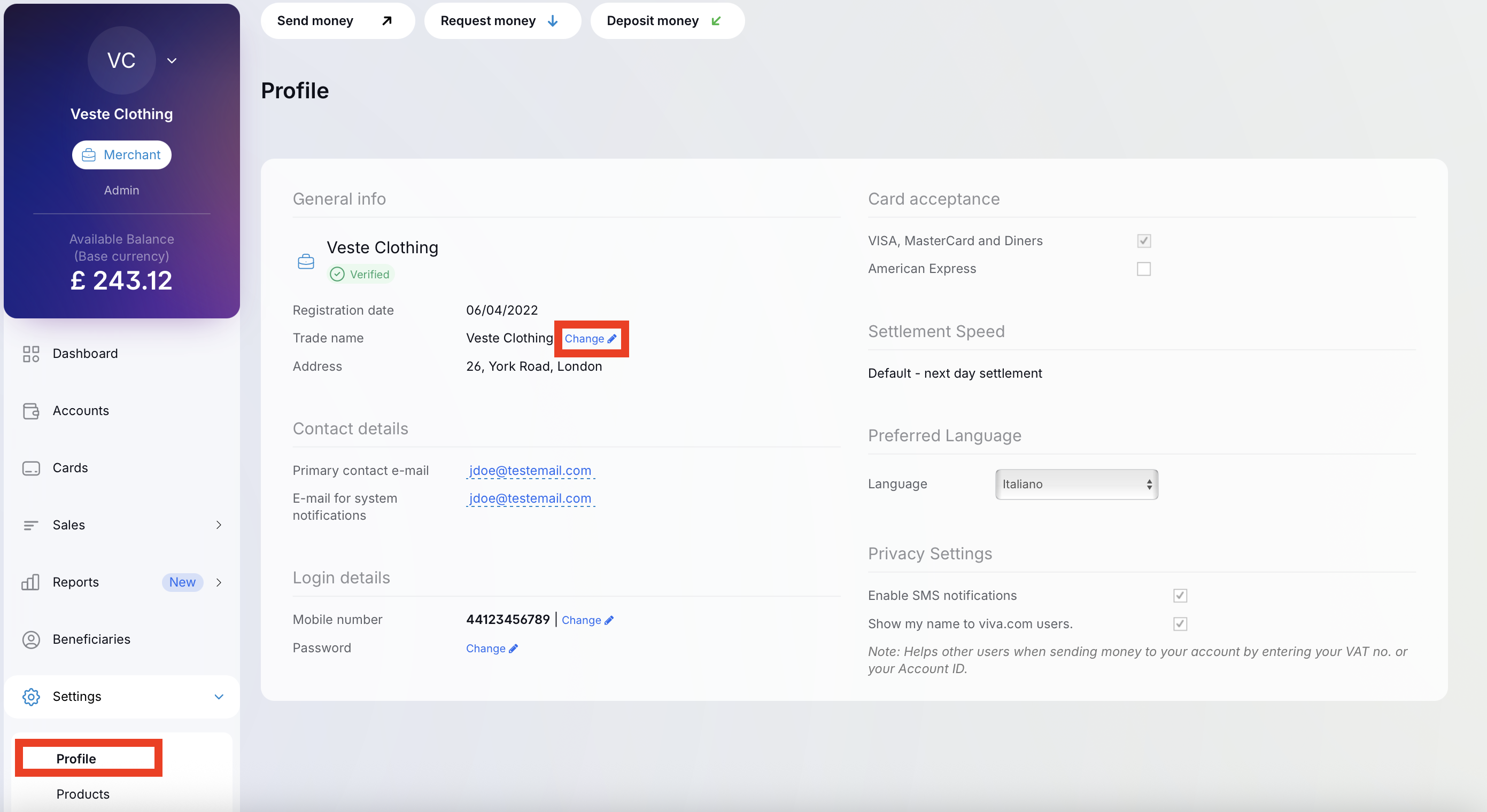
- Under the General info, locate the Trade Name option and click Change. You can then enter and save your preferred trade name.
Get Support
If you would like to integrate with Viva, or if you have any queries about our products and solutions, please see our Contact & Support page to see how we can help!