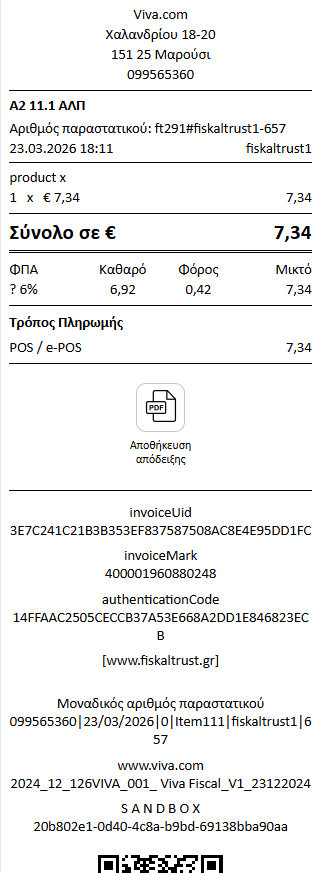
According to the Greek Accounting Standards (Law 4308/2014 - Article 12) and the technical specifications set by AADE for the myDATA platform, Document Type 11.1 (Retail Sales Receipt) must include specific mandatory elements to be considered valid.
1. Issuer Details (The Business)
The identification details of the professional or company making the sale:
- Company Name or Full Name (if it is a sole proprietorship).
- VAT Number (AFM) and the competent Tax Office (DOY).
- Address (headquarters or the specific branch issuing the document).
2. Document Details
The elements that identify the document's uniqueness in time:
- Document Title (e.g., "Retail Sales Receipt" or "Service Provision Receipt").
- Date and Time of issuance.
- Sequential Number (and Series, if the business uses document series).
3. Transaction Details (Financials)
The financial breakdown of the transaction:
- Description of the goods sold or services provided.
- Quantity of the goods.
- Net Value per item or category.
- VAT Rate (or VAT exemption, if applicable, along with the relevant legal article).
- Total Amount (final value including VAT) to be paid by the customer.
4. Special Transmission Details (AADE / myDATA / Fiscal Devices)
Depending on the issuance method (Cash Register, E-Invoicing Provider, or ERP), the following are required:
- QR Code: Mandatory on all retail receipts, allowing consumers to verify validity via the "appodixi" app.
- MARK (Unique Registration Number): Assigned by myDATA upon successful transmission of the document summary.
- Digital Signature / UID: If issued by a Fiscal Electronic Device (EAFDSS), the digital signature is printed. If issued by a certified E-Invoicing Provider, the Document Identifier string is required.
Important Note: For document type 11.1, the customer's details (VAT number, Full Name) are not required. The only exception is specific service categories (e.g., medical receipts) where the name can be included optionally for tax deduction purposes.