
Bank transfer API (Deprecated)
Information about the deprecated - but still functional - version of our Bank transfer API.
Overview
Our deprecated Bank transfer API allows you to perform a number of actions for the management of linked bank accounts and external bank transfers.
API calls
Our deprecated Bank transfer API consists of the below calls. To initiate an external bank transfer you need perform steps 1, 2 and 3.
- Validate IBAN
- Link bank account
- Create outgoing bank transfer command
- Retrieve bank account details by ID
- Retrieve bank accounts
- Unlink bank account
1. Validate IBAN
Use this API Call to ensure that an IBAN is valid.
2. Link bank account
Use this API Call to link a bank account (create a new beneficiary using an external IBAN). It is strongly recommended to first make sure that the IBAN is valid by using the Validate IBAN API call.
3. Create outgoing bank transfer command
Before you can use this API call you need to “allow transfers between accounts” in the viva banking app:
Sign in to Viva and select the required account.
Go to Settings > API Access.
Select the Allow transfers between accounts checkbox as shown below:
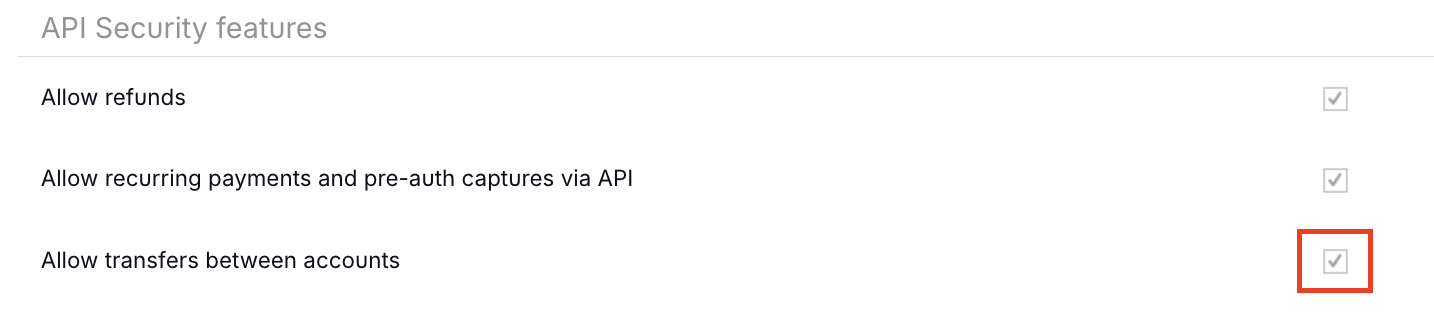
The new setting is saved automatically.
✔️ You need only do this for the source wallet.
- Τhe parameter ‘
walletId’ is missing or is not valid - The ‘
bankAccountId’ parameter is missing or is not valid or is linked with a non-valid IBAN (refer to the Validation IBAN API Call) - The currency of the ‘
bankAccountId’ and the currency of the ‘walletId’ are different - The ‘
amount’ parameter is not greater than zero (0) - Insufficient funds in ‘
walletId’. There should be at least as much money available in ‘walletId’ as the proposed transfer amount
4. Retrieve linked bank account details by ID
Use this API Call to retrieve a linked bank account (beneficiary using an external IBAN) by its ID.
5. Retrieve linked bank accounts
Retrieve the linked bank accounts (beneficiaries using external IBANs) set up under your Viva profile.
6. Unlink bank account
Use this API Call to unlink a linked bank account (beneficiary using an external IBAN) by ID.
Get Support
If you would like to integrate with Viva, or if you have any queries about our products and solutions, please see our Contact & Support page to see how we can help!