
Receipt Mapping
Visualizing the Fiscal Receipt
This guide shows how the core JSON objects in the Viva API map directly to the physical elements of a compliant fiscal receipt.
The Global Mapping
| Receipt Section | JSON Object | Description |
|---|---|---|
| Header | ftReceiptCaseData |
Merchant details, Tax ID (AFM), and POS info |
| Line Items | cbChargeItems |
Product names, quantities, VAT |
| Payments | cbPayItems |
Payment method (Cash, Card, etc.) |
| Receipt Case | ftReceiptCase |
Sale, Refund, Invoice |
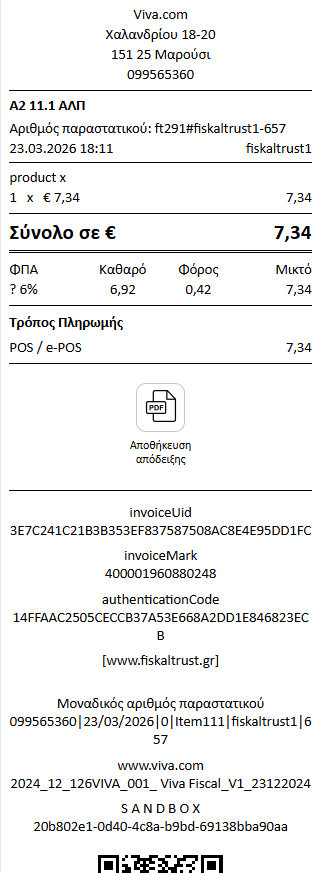
Example 11.1: Standard Retail Sale
Below is a simplified example of a standard sale and how the data is structured.
The Payload (Simplified)
{
      "cbChargeItems":
      [
      {
          "amount": 124,
          "description": "product x",
          "position": 1,
          "moment": "2025-08-27T16:11:06Z",
          "quantity": 100,
          "vatRate": 2400,
          "vatAmount": 24,
          "ftChargeItemCase": 5139205309155246099,
          "currencyCode": 978
      }
      ],

      "cbPayItems":
      [
          {
              "amount": 124,
              "description": "cash-payment",
              "position": 1,
              "currencyCode": "978",
              "moment": "2025-08-27T16:11:06Z",
              "ftPayItemCase": 5139205309155246081
          }
      ],
      "cbReceiptMoment":  "2025-08-27T16:11:06Z",
      "cbReceiptReference": "testreceiptreference1",
      "ftReceiptCase": 5139205309155770369,
      "currencyCode": "978",
      "ftReceiptCaseData": {
        "GR":
        {
            "MerchantVATID": "123456789",
            "Series": "AB",
            "AA": 1,
            "HashAlg": "sha256",
            "HashPayload": "123456789-AB-1-testreceiptreference1-2025-08-27T16:11:06Z-1.24"
        }
      }
  }
How to read this
Think of every fiscalised transaction as three core parts:
- 🟢 What was sold →
cbChargeItems- Products or services
- Quantity, price, VAT
- 🔵 How it was paid →
cbPayItems- Card, Cash, etc.
- Payment amount
- 🟣 What type of transaction →
ftReceiptCase- Sale
- Refund
- Invoice (Timologio)
Useful links
If you need detailed logic and full schemas, refer to the following guides:
- 👉 Understanding receipt types (ftReceiptCase)
- 👉 Mapping line items (cbChargeItems)
- 👉 Payment methods (cbPayItems)