
Surcharge
Information on Surcharge functionality.
- Overview
- How to Activate Surcharge Functionality
- Customer Experience
- View Surcharge Transactions
- Eligible Terminals, Transactions & Cards
- Testing Surcharge in Demo
- Get Support
Overview
Surcharge functionality allows merchants to pass applicable surcharge fees (MerchantServiceCharge) to the cardholder when payments are made via POS using business or Non-EEA cards.
When enabled and applicable, the surcharge amount is automatically calculated and added to the transaction total, allowing merchants to recover transactional costs such as Interchange Fees, Scheme Fees, and Viva Service Fees.
Features, benefits & restrictions
Features
- Enables passing surcharge fees to cardholders for eligible transactions.
- Surcharge amount is automatically calculated and applied.
- Applicable to Business cards and Non-EEA Consumer cards.
- Supports full and partial refunds, voids, cancellations, and reversals.
- Surcharge amount is always calculated as a percentage of the original sale amount.
- Surcharge is applied in the same currency as the transaction.
- Surcharge details are visible in Viva Self-Care transaction reporting.
- Supported across multiple POS devices and interaction types.
Restrictions
- Pre-authorisation transactions are not supported.
- Surcharge percentages cannot be customised.
- Third-party card schemes (e.g. Amex, Diners) are excluded from surcharge calculations.
- Offline transactions are excluded from surcharge functionality, as eligibility checks require an active internet connection.
How to Activate Surcharge Functionality
| Environment | Activation details |
|---|---|
| Production | To activate Surcharge functionality, please contact your Viva Sales representative or reach out via the Live Chat option in your Production Viva Self-Care account. |
| Demo | To activate surcharge functionality in the demo environment, please contact Viva support. |
Customer Experience
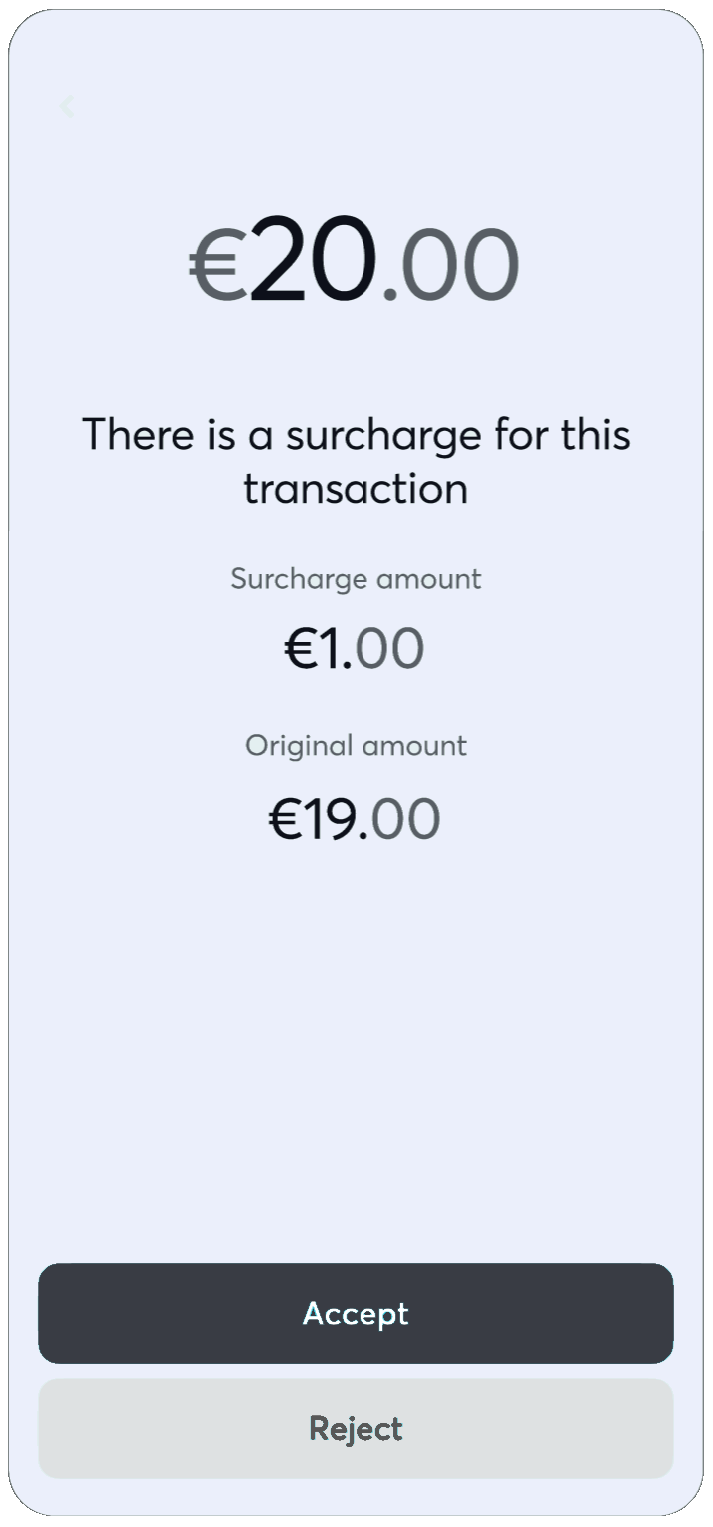
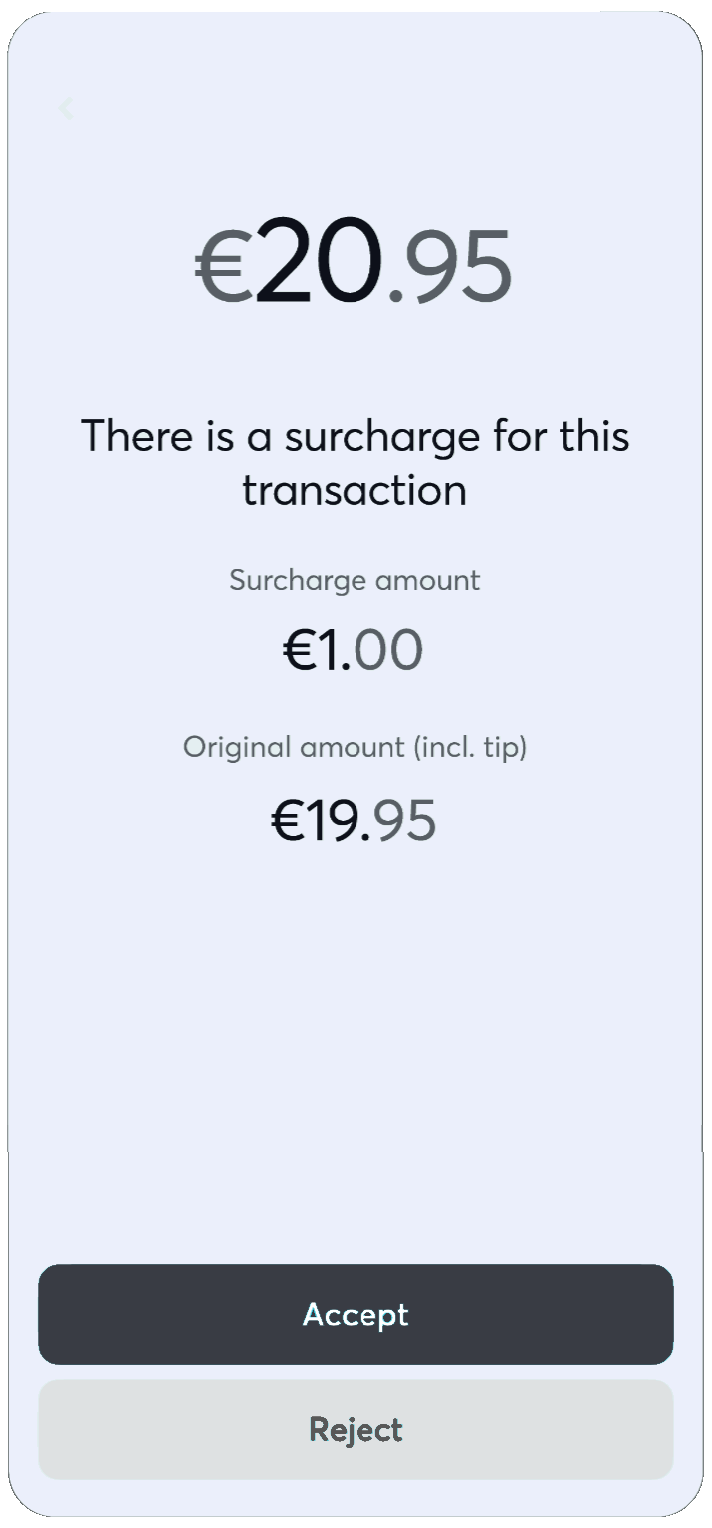
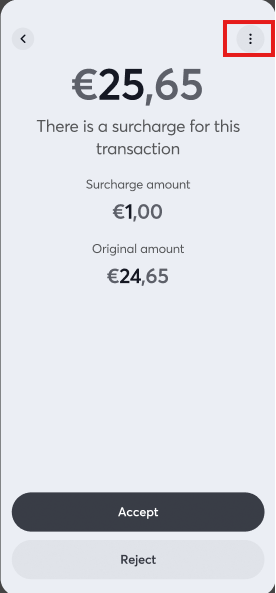
Sale flow for in-person payments
 |
 |
 |
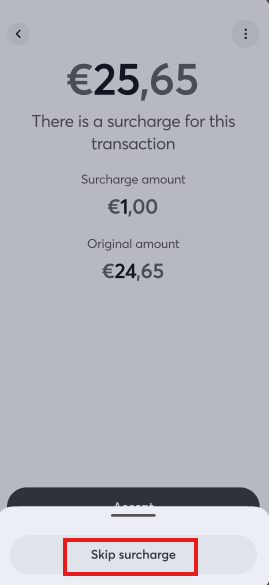 |
Customers may skip the surcharge by selecting the Skip surcharge option from the menu during the payment flow.
Refund flow for in-person payments
In case of refunds, the surcharge amount is recalculated proportionally based on the refunded amount.
As an example:
- Sales Amount: €10 | Surcharge: €2 | Total Amount €12
- Partial Refund: €6
- Transaction Amount: €6
- Surcharge Amount: (Partial Refund Amt/Total Amount) x Initial Surcharge Amount = €1
View Surcharge Transactions
Merchants can view surcharge-related details directly in their Viva Self-Care account:
- Filter transactions with or without surcharge via Sales → Sales Transactions (Advanced Search).
- View Surcharge Amount in Transaction Details.
- Export surcharge details in
.xlsreports.
Eligible Terminals, Transactions & Cards
Terminals & Devices
- Tap-on-Phone
- PAX Devices
- Datecs BluePad (coming soon)
Interaction Types
- Contact
- Contactless
Transaction Types
- Sales
- Refunds (Full & Partial)
- Voids / Cancellations
- Reversals
Schemes & Card Types
| Scheme | Supported card types |
|---|---|
| Visa |
|
| MasterCard/Maestro | |
| American Express | All types of cards |
| Diners/Discover |
Surcharge calculation
In cases where surcharge functionality applies, we will first check the card eligibility based on the criteria defined. If applicable, we will then calculate and determine the surcharge amount of the transaction, as below:
- The surcharge amount will be always a percentage of the initial sale amount
- The surcharge amount will be always in the same currency (DKK) as the sale amount
- The percentage per-case will be calculated depending on the card type (business/consumer) and the region of the transaction as defined below:
- Domestic Business Card → 2.5% of the sales amount
- EEA Business Card → 3.0% of the sales amount
- Non-EEA Business Card → 3.95% of the sales amount
- Non-EEA Consumer Card → 3.95% of the sales amount
Testing Surcharge in Demo
To activate surcharge functionality in demo, please get in touch with Viva.
When surcharge is activated, the following amounts will trigger the surcharge flow on terminals:
- 21,09
- 51,09
- 101,09
- 501,09
To successfully trigger the surcharge, complete the transaction using any card.
Get Support
If you would like to integrate with Viva or have questions about surcharge functionality, please visit our Contact & Support page.