
Card Present Tokenization
How to use card tokenization for Card Present transactions.
Overview
This document provides developers with a structured guide on how to implement card-present tokenization using Viva Payments API. The process involves securely capturing and tokenizing card details from a physical terminal, retrieving the transaction details, and processing the final charge using ISV credentials. Each step is accompanied by the necessary API calls and authentication methods to ensure a secure and efficient card-present payment experience.
Payments Flow Diagram
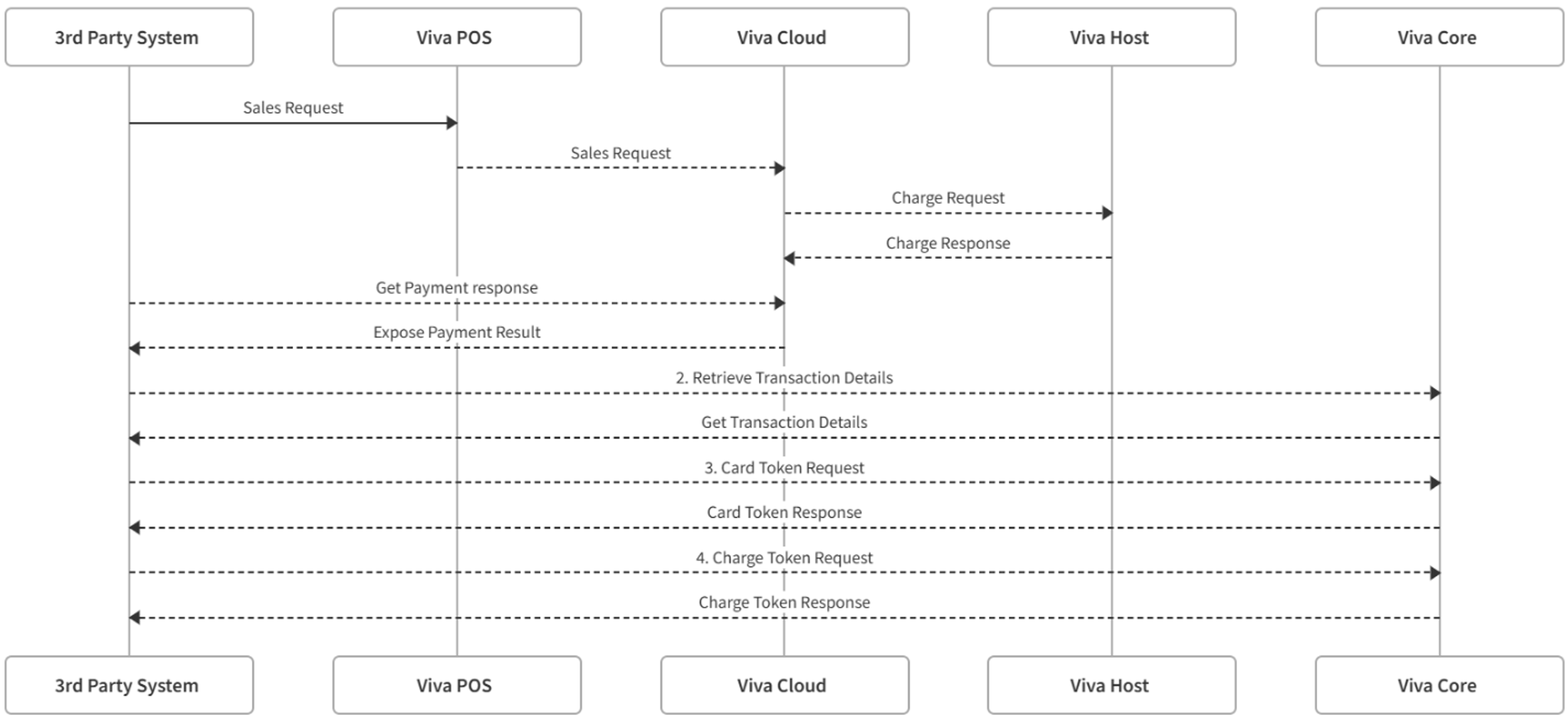
Card Present Tokenization
1. Send a Sale Request
👉 Merchants
Start by sending a sale request to the terminal using your Merchant POS credentials. This initializes the transaction process.
👉 ISV Partners
Start by sending a sale request to the terminal using your ISV credentials. This initializes the transaction process.
2. Retrieve Transaction Details
After sending the sale request, obtain the unique transactionId associated with the transaction. Having the transaction ID, you can retrieve the expiration date of the transacted card by retrieving transaction details and the card’s expiration date field from the response.
👉 Merchants
Retrieve Transaction Details API Call for Merchants
👉 ISV Partners
Retrieve Transaction Details API Call for ISV partners
3. Create a Card Token
Using the transactionId obtained earlier, make a request to create a Card Token. The generated token (ct_..) represents the customer’s payment method token. Make sure to use the Merchant’s Smart Checkout Credentials.
4. Create Charge Token
👉 Merchants
Use the merchant’s Native Credentials (provided by Viva.com) to create a one-time charge token(Via oAuth authentication).
/nativecheckout/v2/chargetokens
| Environment | URL |
|---|---|
| Production | https://api.vivapayments.com/nativecheckout/v2/chargetokens |
| Demo | https://demo-api.vivapayments.com/nativecheckout/v2/chargetokens |
👉 ISV Partners
Use ISV credentials to create a one-time charge token(Via oAuth authentication).
/nativecheckout/v2/isv/chargetokens?MerchantId=xxx
| Environment | URL |
|---|---|
| Production | https://api.vivapayments.com/nativecheckout/v2/isv/chargetokens?MerchantId=xxx |
| Demo | https://demo-api.vivapayments.com/nativecheckout/v2/isv/chargetokens?MerchantId=xxx |
Request sample:
curl '[Environment URL]'
-H 'Authorization: Bearer [access token]'
-H 'Content-Type: application/json'
-d '{
  "moto": true,
  "amount": 1000,
  "token": "Card Token from the previous call",
  "holderName": "name",
  "expirationYear": 2030,
  "expirationMonth": 5,
  "currencyCode": "978"
   }'
Response sample:
{
    "chargeToken": "ctok_bcGN8H87tGi1qtxtEoYkliYgMrc",
    "redirectToACSForm": "<html><head></head><body>Hey there! Don't forget to render me!</body></html>"
}
This API call returns a one-time Charge Token (ctok_..) which is required for the final transaction step.
5. Charge Card Token
👉 Merchants
With the Charge Token obtained in the previous step, you can now complete the transaction by making a request authenticated with a Bearer token using Native Credentials(provided by Viva.com).
/nativecheckout/v2/transactions
| Environment | URL |
|---|---|
| Production | https://api.vivapayments.com/nativecheckout/v2/transactions |
| Demo | https://demo-api.vivapayments.com/nativecheckout/v2/transactions |
👉 ISV Partners
With the Charge Token obtained in the previous step, you can now complete the transaction by making a request using Bearer Token authentication with ISV credentials:
Endpoint:
/nativecheckout/v2/isv/transactions?MerchantId=xxx
| Environment | URL |
|---|---|
| Production | https://api.vivapayments.com/nativecheckout/v2/isv/transactions?merchantId=xxx |
| Demo | https://demo-api.vivapayments.com/nativecheckout/v2/isv/transactions?merchantId=xxx |
Request sample:
curl '[Environment URL]'
-H 'Authorization: Bearer [access token]'
-H 'Content-Type: application/json'
-d '{
  "amount": 1000,
  "tipAmount": 0,
  "isvAmount": 0,
  "preauth": false,
  "chargeToken": "Charge Token you got from the previous step",
  "installments": 1,
  "allowRecurring": false,
  "merchantTrns": "Merchant transaction reference",
  "customerTrns": "Short description of items/services purchased to display to your customer",
  "currencyCode": 978,
  "sourceCode": "Default",
  "isCardVerification": false,
  "saleToAcquirerData": "ImFkZGl0aW9uYWxEYXRhIjogewogICAgICAibG9kZ2luZy5jYW5jZWxsYXRpb25EdWVEYXRlIjogIjIwMjYtMTEtMDNUMTg6MDA6MDArMDM6MDAiLAogICAgICAibG9kZ2luZy5jaGVja0luRGF0ZSI6ICIyMDI2LTEyLTAzIiwKICAgICAgImxvZGdpbmcuY2hlY2tPdXREYXRlIjogIjIwMjYtMTItMDUiLAogICAgICAibG9kZ2luZy5mb2xpb051bWJlciI6ICIzMDA4NDYwIiwKICAgICAgImxvZGdpbmcuY3VzdG9tZXJDb2RlIjogImhsZzBpNmZmZXJndDZja051M0ZXVjFDUHJ4RWVhcm5rPSIKICAgIH0=",
  "paymentMethodId": 0,
  "customer": {
    "email": "johndoe@viva.com",
    "phone": "442037347770",
    "fullname": "John Doe",
    "lastName": "Doe",
    "firstName": "Jonn",
    "requestLang": "en",
    "countryCode": "GB"
   }
}'To view a sample JSON structure and generate the corresponding encoded value, please visit this link.
Response sample:
{
  "transactionId": "1549bffb-f82d-4f43-9c07-0818cdcdb2c4"
}
Upon successful execution of this request, the transaction is completed, and the charge is processed.
6. Capture a pre-auth (Optional)
For cases where a pre-authorization is created instead of a charge, a separate call to the transaction endpoint is required. You must pass the pre-authorized amount—or a smaller amount—to capture the funds.
👉 Merchants
Merchant Endpoint:
/nativecheckout/v2/transactions/{preauthTransactionId}
| Environment | URL |
|---|---|
| Production | https://api.vivapayments.com/nativecheckout/v2/transactions/{preauthTransactionId} |
| Demo | https://demo-api.vivapayments.com/nativecheckout/v2/transactions/{preauthTransactionId} |
👉 ISV Partners
ISV Endpoint:
/api/transactions/{transactionId}
| Environment | URL |
|---|---|
| Production | https://www.vivapayments.com/api/transactions/{transactionId} |
| Demo | https://demo.vivapayments.com/api/transactions/{transactionId} |
Request sample:
curl -X POST \
  https://demo-api.vivapayments.com/nativecheckout/v2/transactions/b1a3067c-321b-4ec6-bc9d-1778aef2a19d \
  -H 'Authorization: Bearer [access token]' \
  -H 'Content-Type: application/json' \
  -d '{
    "amount": 300,
    "sourceCode": "Default", // optional
    "currencyCode": 978 // optional
}'
Response sample:
{
  "transactionId": "1549bffb-f82d-4f43-9c07-0818cdcdb2c4"
}
Get Support
If you would like to integrate with Viva, or if you have any queries about our products and solutions, please see our Contact & Support page to see how we can help!